If you’ve ever seen ghost rows appear in a report, a counter go negative under load, or two users overwrite each other’s data without warning — you’ve already hit isolation level problems. Let’s break down each level with real scenarios, so you know exactly when and why to use each one.
The core problem: concurrent transactions
SQL Server runs many transactions at the same time. Without any protection, they can step on each other in three classic ways:
| Problem | What happens |
|---|---|
| Dirty read | You read data another transaction hasn’t committed yet — and may never commit |
| Non-repeatable read | You read the same row twice, and get different values because another transaction updated it between your two reads |
| Phantom read | You run the same query twice, and get different rows because another transaction inserted or deleted rows between your two reads |
SQL Server’s isolation levels are your control knob for which of these you allow, and which you prevent.
Setup — the two tables we’ll use throughout
-- A page view counter (concurrent write scenario)
CREATE TABLE dbo.PageCounters (
    PageId      INT           NOT NULL PRIMARY KEY,
    PageName    NVARCHAR(100) NOT NULL,
    ViewCount   BIGINT        NOT NULL DEFAULT 0,
    LastUpdated DATETIME2     NOT NULL DEFAULT SYSDATETIME()
);

INSERT INTO dbo.PageCounters (PageId, PageName, ViewCount)
VALUES (1, 'Home',     0),
       (2, 'About',    0),
       (3, 'Products', 0);


-- A user account table (balance / profile scenario)
CREATE TABLE dbo.Users (
    UserId      INT            NOT NULL PRIMARY KEY IDENTITY(1,1),
    Username    NVARCHAR(50)   NOT NULL UNIQUE,
    Email       NVARCHAR(150)  NOT NULL,
    Balance     DECIMAL(18,2)  NOT NULL DEFAULT 0.00,
    Status      NVARCHAR(20)   NOT NULL DEFAULT 'Active',  -- Active | Suspended | Deleted
    CreatedAt   DATETIME2      NOT NULL DEFAULT SYSDATETIME()
);

INSERT INTO dbo.Users (Username, Email, Balance, Status)
VALUES ('alice',   '[email protected]',   500.00, 'Active'),
       ('bob',     '[email protected]',     200.00, 'Active'),
       ('charlie', '[email protected]', 750.00, 'Active');
READ UNCOMMITTED
What it does
READ UNCOMMITTED is the lowest isolation level. A transaction can read data that another transaction has written but not yet committed — including changes that may be rolled back. It takes no shared locks when reading, and ignores exclusive locks held by writers.
Timeline:

Transaction A                          Transaction B (reader)
─────────────────────────────────────────────────────────────
BEGIN TRAN
UPDATE PageCounters
  SET ViewCount = 9999              ← not committed yet
  WHERE PageId = 1
                                    SET TRANSACTION ISOLATION LEVEL
                                        READ UNCOMMITTED;
                                    SELECT ViewCount FROM PageCounters
                                        WHERE PageId = 1;
                                    → Returns 9999  ← DIRTY READ
ROLLBACK                            ← Transaction A never committed!
                                    → 9999 never actually existed
Scenario — real-time dashboard counter
You’re building a live dashboard that shows page view counts updating every second. The numbers are purely informational — no business decision depends on them being 100% exact. Accuracy within a few hundred reads is perfectly fine.
-- ✅ Dashboard query: we don't care about in-flight transactions
SET TRANSACTION ISOLATION LEVEL READ UNCOMMITTED;

SELECT
    PageId,
    PageName,
    ViewCount,
    LastUpdated
FROM dbo.PageCounters WITH (NOLOCK)   -- equivalent hint
ORDER BY ViewCount DESC;
The WITH (NOLOCK) hint is identical to READ UNCOMMITTED for a single table — you’ll see it heavily used in reporting queries.
Why this is the right choice here:
- The counter update transactions are tiny (a single UPDATE). The window of “dirty” data is microseconds.
- The dashboard has no readers blocking writers or writers blocking readers — zero contention.
- If a few reads are slightly stale or catch a mid-transaction value, the impact is zero — it’s a display number.
- Throughput is maximized: no lock acquisition overhead on every read.
⚠️ When NOT to use it:
Never use READ UNCOMMITTED when reading data that drives a business decision — balance checks, stock levels, order totals. A rolled-back transaction can make you see money that doesn’t exist or inventory that was never committed.
READ COMMITTED
What it does
READ COMMITTED is the SQL Server default. A transaction only reads data that has been committed. It acquires a shared lock per row/page as it reads, then releases that lock immediately — it does not hold it for the duration of the transaction. This means:
- No dirty reads ✅
- Non-repeatable reads are still possible ⚠️
- Phantom reads are still possible ⚠️
Timeline:

Transaction A (writer)                 Transaction B (reader)
─────────────────────────────────────────────────────────────
BEGIN TRAN
UPDATE Users SET Balance = 0
  WHERE UserId = 1               ← exclusive lock held
                                 BEGIN TRAN
                                 SELECT Balance FROM Users
                                   WHERE UserId = 1;
                                 → BLOCKED — waits for A to finish
COMMIT
                                 → Now reads: 0  ← committed value only
Scenario — user balance display
A user opens their account page. You need to show their current balance. You don’t want to show them a balance from a transaction mid-flight — but you also don’t need to guarantee the value won’t change if they refresh the page one second later.
-- This is the default
SET TRANSACTION ISOLATION LEVEL READ COMMITTED;

-- User opens their account page
SELECT
    UserId,
    Username,
    Balance,
    Status
FROM dbo.Users
WHERE UserId = @UserId;
Scenario — counter increment
Now consider the counter increment — the standard pattern you’ll use in high-traffic APIs:
-- ✅ Safe counter increment under READ COMMITTED
-- This is an atomic single-statement UPDATE — no read-then-write race
UPDATE dbo.PageCounters
SET
    ViewCount   = ViewCount + 1,
    LastUpdated = SYSDATETIME()
WHERE PageId = @PageId;
This single-statement update is safe under READ COMMITTED because SQL Server takes an exclusive row lock for the duration of the UPDATE, making the read-modify-write atomic. You do not need a higher isolation level for this pattern.
Why this is the right choice here:
- The user never sees half-written data — balance changes are always committed.
- Locks are released immediately after each read, so long-running reads don’t block writers.
- The default for a reason: it’s the good spot between safety and throughput for most OLTP workloads.
⚠️ Watch out for:
If you read a value, do some business logic, then read again in the same transaction expecting the same value — you may not get it. That’s a non-repeatable read, and it matters when you’re computing derived values across multiple statements.
REPEATABLE READ
The problem with READ COMMITTED for multi-step reads
Under READ COMMITTED, shared locks are released immediately after each read. That means between two reads in the same transaction, another transaction is free to modify the row. This is called a non-repeatable read — and it’s a real problem when your logic depends on a value staying stable.
Timeline — the race condition under READ COMMITTED:

Transaction B (reader)                     Transaction A (writer)
──────────────────────────────────────────────────────────────────
BEGIN TRAN
SELECT Balance FROM Users
  WHERE UserId = 1;
→ 500.00  ← shared lock acquired, then
           RELEASED immediately
                                            BEGIN TRAN
                                            UPDATE Users
                                              SET Balance = 0.00
                                              WHERE UserId = 1;
                                            COMMIT  ← succeeds, no lock blocking it
-- business logic: "she has 500, transfer 150"
SELECT Balance FROM Users
  WHERE UserId = 1;
→ 0.00  ← different value — the row changed
          between our two reads!
-- we deduct 150 from 0.00 → account goes negative 💥
COMMIT
The first read saw 500.00. The logic said “enough funds”. By the time the UPDATE ran, the balance was 0.00. READ COMMITTED gave no protection in that window.
What REPEATABLE READ does
REPEATABLE READ fixes this by holding shared locks on every row you read until the transaction commits or rolls back — not releasing them immediately. No other transaction can modify or delete those rows while you hold the lock.
- No dirty reads ✅
- No non-repeatable reads ✅
- Phantom reads are still possible ⚠️ (new rows can be inserted)
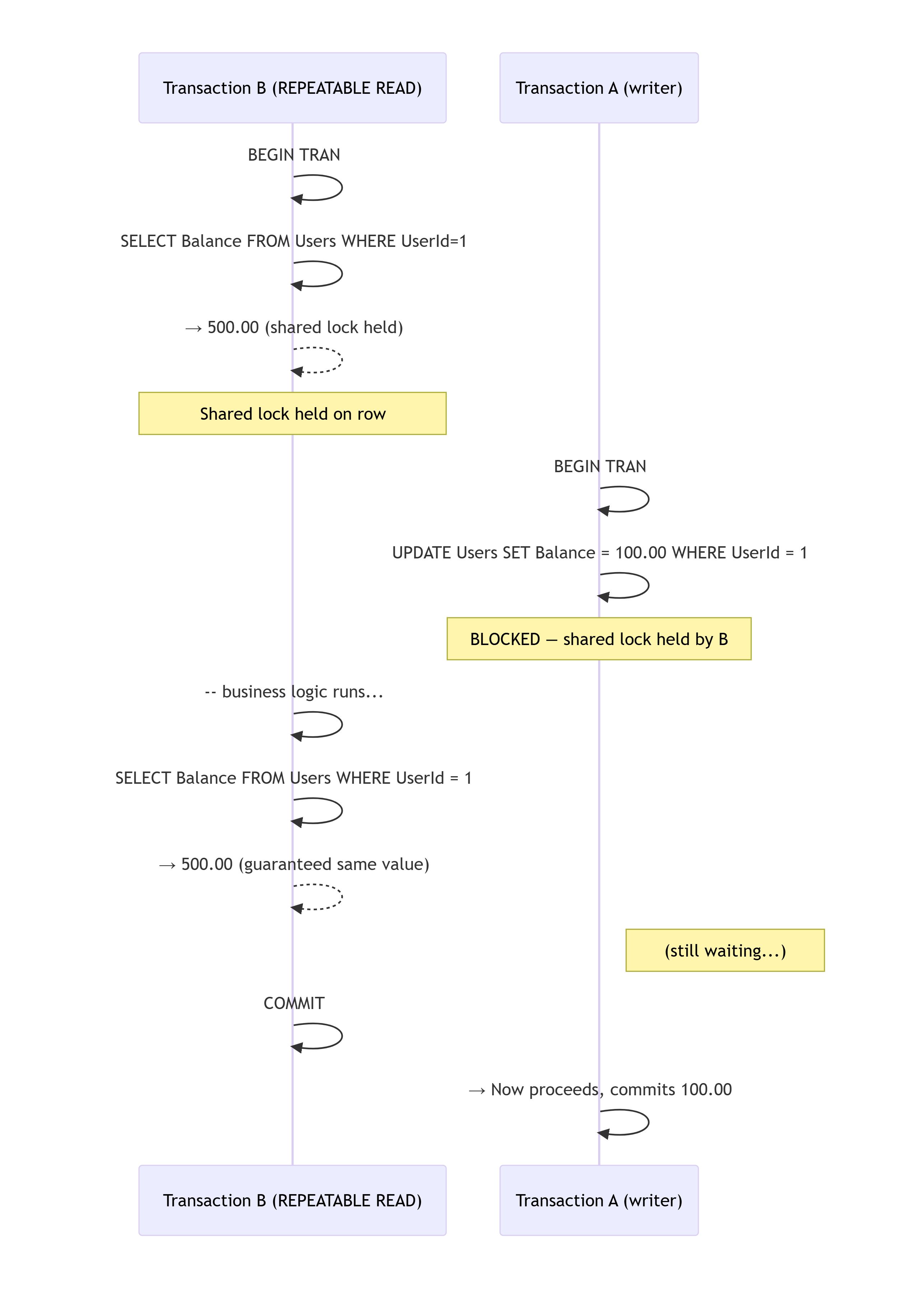
Timeline — the same scenario under REPEATABLE READ:

Transaction B (reader, REPEATABLE READ)    Transaction A (writer)
──────────────────────────────────────────────────────────────────
BEGIN TRAN
SELECT Balance FROM Users
  WHERE UserId = 1;
→ 500.00  ← shared lock held on this row
                                            BEGIN TRAN
                                            UPDATE Users
                                              SET Balance = 0.00
                                              WHERE UserId = 1;
                                            → BLOCKED — shared lock still held by B
-- business logic: "she has 500, transfer 150" — still safe
SELECT Balance FROM Users
  WHERE UserId = 1;
→ 500.00  ← guaranteed same value          (still waiting...)
COMMIT                                      → Now proceeds, commits 0.00
Scenario — account transfer with validation
A user initiates a transfer. You need to: read Alice’s balance, verify she has enough funds, and then deduct. If another transaction reduces her balance between your check and your deduct, you could overdraft her account.
SET TRANSACTION ISOLATION LEVEL REPEATABLE READ;

BEGIN TRANSACTION;

-- Step 1: Read the sender's balance
-- The shared lock is held on this row until COMMIT
DECLARE @CurrentBalance DECIMAL(18,2);
DECLARE @TransferAmount DECIMAL(18,2) = 150.00;
DECLARE @SenderId INT = 1;   -- Alice
DECLARE @ReceiverId INT = 2; -- Bob

SELECT @CurrentBalance = Balance
FROM dbo.Users
WHERE UserId = @SenderId;

-- Step 2: Business logic — still safe, no one can change Alice's balance
IF @CurrentBalance < @TransferAmount
BEGIN
    ROLLBACK;
    RAISERROR('Insufficient funds.', 16, 1);
    RETURN;
END

-- Step 3: Deduct from sender
UPDATE dbo.Users
SET Balance = Balance - @TransferAmount
WHERE UserId = @SenderId;

-- Step 4: Credit receiver
UPDATE dbo.Users
SET Balance = Balance + @TransferAmount
WHERE UserId = @ReceiverId;

COMMIT;
Why this is the right choice here:
- Between the balance check (step 1) and the deduction (step 3), Alice’s balance is locked. No concurrent transaction can drain it in that window.
- Without this, two simultaneous transfers from Alice’s account could both pass the balance check, both deduct, and push her into negative balance.
- The lock scope is narrow — only the rows you actually read, not the whole table.
⚠️ Watch out for:
- Deadlocks increase. If two transactions each hold a shared lock on a row and then both try to upgrade to an exclusive lock (UPDATE), they deadlock each other.
- Phantom reads are still possible — a
SELECT COUNT(*)in the same transaction can return different values if rows are inserted by another transaction between the two reads.
Here’s the improved section:
SERIALIZABLE
The problem with REPEATABLE READ for range queries
REPEATABLE READ locks the rows you already read — but it does nothing about rows that don’t exist yet. Another transaction can still insert new rows that fall inside your WHERE clause range. You read a count, trust it, act on it — then a phantom row appears and breaks your logic.
Timeline — the phantom insert under REPEATABLE READ:

Transaction B (reader)                     Transaction A (inserter)
────────────────────────────────────────────────────────────────────
BEGIN TRAN
SELECT COUNT(*) FROM dbo.UserSessions
  WHERE UserId = 1
    AND ExpiresAt > SYSDATETIME();
→ 4  ← shared locks on existing rows,
       but NO lock on the gap (new rows)
                                            BEGIN TRAN
                                            INSERT INTO dbo.UserSessions
                                              (UserId, Token, ExpiresAt)
                                              VALUES (1, NEWID(),
                                                DATEADD(HOUR,24,SYSDATETIME()));
                                            COMMIT  ← succeeds, nothing blocking it
-- logic: "4 sessions < 5 max, allow login"
INSERT INTO dbo.UserSessions
  (UserId, Token, ExpiresAt)
  VALUES (1, NEWID(),
    DATEADD(HOUR,24,SYSDATETIME()));
COMMIT
-- user now has 6 active sessions 💥
-- both transactions passed the same check
REPEATABLE READ protected the rows it read — but Transaction A inserted a new row into the same range while B wasn’t looking. Both transactions saw 4, both inserted, user ends up with 6. This is a phantom read.
What SERIALIZABLE does
SERIALIZABLE closes that gap. Instead of locking only existing rows, it locks the entire key range that matches your WHERE clause — including the space where new rows would land. Any attempt to insert into that range is blocked until your transaction finishes.
- No dirty reads ✅
- No non-repeatable reads ✅
- No phantom reads ✅
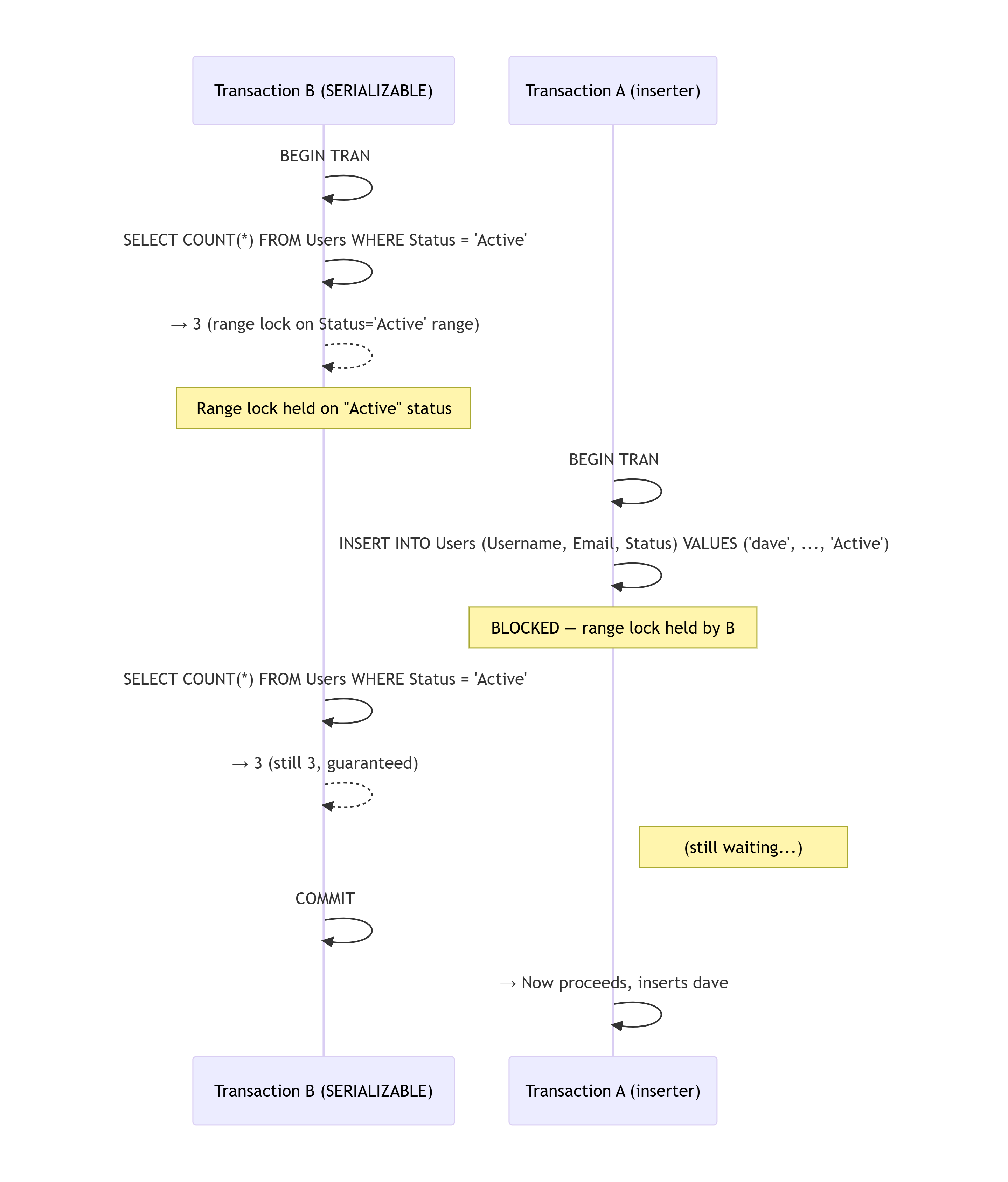
Timeline — the same scenario under SERIALIZABLE:

Transaction B (SERIALIZABLE)               Transaction A (inserter)
────────────────────────────────────────────────────────────────────
BEGIN TRAN
SELECT COUNT(*) FROM dbo.UserSessions
  WHERE UserId = 1
    AND ExpiresAt > SYSDATETIME();
→ 4  ← range lock on UserId = 1 session range
       new rows CANNOT be inserted here
                                            BEGIN TRAN
                                            INSERT INTO dbo.UserSessions
                                              (UserId, Token, ExpiresAt)
                                              VALUES (1, NEWID(),
                                                DATEADD(HOUR,24,SYSDATETIME()));
                                            → BLOCKED — range lock held by B
-- logic: "4 sessions < 5 max, allow login"
INSERT INTO dbo.UserSessions ...
COMMIT                                      → Now proceeds, user has 5 sessions
                                            COMMIT  ← now blocked at 6? No —
                                            → this is the 6th insert, but B
                                              already committed, lock released.
                                            -- You handle this with app logic
                                            -- or a UNIQUE constraint as a safety net
Scenario — counter with read-check-write logic
You have a feature limit: a user can register at most 5 active sessions. You check the count, then insert. Without SERIALIZABLE, two simultaneous requests can both see 4 sessions, both pass the check, both insert — leaving the user with 6.
-- Session tracking table
CREATE TABLE dbo.UserSessions (
    SessionId   INT           NOT NULL PRIMARY KEY IDENTITY(1,1),
    UserId      INT           NOT NULL,
    Token       NVARCHAR(100) NOT NULL UNIQUE,
    CreatedAt   DATETIME2     NOT NULL DEFAULT SYSDATETIME(),
    ExpiresAt   DATETIME2     NOT NULL,
    CONSTRAINT FK_Sessions_Users FOREIGN KEY (UserId)
        REFERENCES dbo.Users(UserId)
);

CREATE INDEX IX_UserSessions_UserId ON dbo.UserSessions(UserId);
SET TRANSACTION ISOLATION LEVEL SERIALIZABLE;

BEGIN TRANSACTION;

DECLARE @UserId INT = 1;
DECLARE @MaxSessions INT = 5;
DECLARE @ActiveCount INT;
DECLARE @NewToken NVARCHAR(100) = NEWID();

-- Step 1: Count active sessions
-- SERIALIZABLE holds a range lock — no new session rows for this UserId
-- can be inserted by any other transaction until we COMMIT
SELECT @ActiveCount = COUNT(*)
FROM dbo.UserSessions
WHERE UserId = @UserId
  AND ExpiresAt > SYSDATETIME();

IF @ActiveCount >= @MaxSessions
BEGIN
    ROLLBACK;
    RAISERROR('Maximum concurrent sessions reached.', 16, 1);
    RETURN;
END

-- Step 2: Insert the new session — safe, no phantom inserts possible
INSERT INTO dbo.UserSessions (UserId, Token, ExpiresAt)
VALUES (@UserId, @NewToken, DATEADD(HOUR, 24, SYSDATETIME()));

COMMIT;

SELECT @NewToken AS NewSessionToken;
Another classic SERIALIZABLE use case is the counter with a hard cap:
SET TRANSACTION ISOLATION LEVEL SERIALIZABLE;

BEGIN TRANSACTION;

DECLARE @PageId INT = 3;
DECLARE @MaxViews BIGINT = 1000000;
DECLARE @CurrentCount BIGINT;

SELECT @CurrentCount = ViewCount
FROM dbo.PageCounters
WHERE PageId = @PageId;

IF @CurrentCount >= @MaxViews
BEGIN
    ROLLBACK;
    -- Trigger a resize/archive operation
    RETURN;
END

UPDATE dbo.PageCounters
SET   ViewCount   = ViewCount + 1,
      LastUpdated = SYSDATETIME()
WHERE PageId = @PageId;

COMMIT;
Why this is the right choice here:
- The range lock on
UserId = @UserIdinUserSessionsmeans no other transaction can insert a row for that user while you’re checking the count. The phantom gap is closed. - You get a true serializable guarantee: the count you read is the count that was true at the moment you check, and it stays true until you commit.
- For low-frequency but high-correctness operations (session creation, order placement, seat booking), the locking cost is acceptable.
⚠️ When NOT to use it:
SERIALIZABLE on high-throughput tables is a deadlock and contention machine. Every range lock blocks not just updates, but inserts in the same key range. Use it surgically — not as a default.
Summary — which level for which situation
| Isolation Level | Dirty Read | Non-Repeatable Read | Phantom Read | Use When |
|---|---|---|---|---|
| READ UNCOMMITTED | ✅ Allowed | ✅ Allowed | ✅ Allowed | Dashboards, metrics, approximate counts — no business decisions |
| READ COMMITTED | ❌ Prevented | ✅ Allowed | ✅ Allowed | Default OLTP: single reads, atomic updates, most API endpoints |
| REPEATABLE READ | ❌ Prevented | ❌ Prevented | ✅ Allowed | Multi-step reads where the same row must be stable (transfers, reservations) |
| SERIALIZABLE | ❌ Prevented | ❌ Prevented | ❌ Prevented | Check-then-insert logic, hard caps, anything where phantom rows would break correctness |
The practical decision tree
Is the read purely informational (dashboard, metric, display)?
  → READ UNCOMMITTED  (or WITH NOLOCK)

Is this a single atomic UPDATE (counter++, balance -= X)?
  → READ COMMITTED  (default) — the UPDATE itself is atomic

Do you read a row, do logic, then update that same row?
  → REPEATABLE READ  (lock the row between read and write)

Do you COUNT or SELECT a range, then INSERT based on that count?
  → SERIALIZABLE  (lock the range to prevent phantom inserts)
Here’s a section you can slot in right after the “Setup” section and before READ UNCOMMITTED — it gives the reader the vocabulary they need before the isolation levels start talking about shared locks, exclusive locks, and range locks.
Lock types — the magic behind
Isolation levels don’t conjure magic — they work by acquiring and releasing different types of locks at different moments. Before diving into each level, it’s worth understanding what those locks actually are.
Shared lock (S)
Acquired when a transaction reads a row. Multiple transactions can hold a shared lock on the same row at the same time — reads don’t block each other. But a shared lock blocks any transaction that wants to modify that row.
Transaction A: SELECT Balance FROM Users WHERE UserId = 1  → acquires S lock on row 1
Transaction B: SELECT Balance FROM Users WHERE UserId = 1  → acquires S lock on row 1  ✅ allowed
Transaction C: UPDATE Users SET Balance = 0 WHERE UserId = 1  → wants X lock → BLOCKED ❌
Exclusive lock (X)
Acquired when a transaction writes a row (INSERT, UPDATE, DELETE). Only one transaction can hold an exclusive lock on a row — and it blocks everyone else, both readers and writers.
Transaction A: UPDATE Users SET Balance = 0 WHERE UserId = 1  → acquires X lock on row 1
Transaction B: SELECT Balance FROM Users WHERE UserId = 1  → wants S lock → BLOCKED ❌
Transaction C: UPDATE Users SET Balance = 500 WHERE UserId = 1  → wants X lock → BLOCKED ❌
Update lock (U)
A stepping stone between S and X. When SQL Server plans to read a row with the intent to update it, it acquires a U lock first. A U lock is compatible with S locks (readers can still read) but not with other U or X locks. This prevents a common deadlock pattern where two transactions each hold S locks and both try to upgrade to X.
Transaction A: SELECT ... WITH (UPDLOCK)  → acquires U lock on row 1
Transaction B: SELECT ... WITH (UPDLOCK)  → wants U lock → BLOCKED ❌
  (prevents both from trying to upgrade to X simultaneously → no deadlock)
Range lock (RangeS-S, RangeX-X, …)
Exclusive to SERIALIZABLE. Instead of locking individual rows, SQL Server locks the key range covered by your WHERE clause — including the gaps between existing rows. This prevents another transaction from inserting a new row that would fall inside your range.
Transaction A (SERIALIZABLE):
SELECT COUNT(*) FROM UserSessions WHERE UserId = 1  → range lock on [UserId = 1] key space

Transaction B:
INSERT INTO UserSessions (UserId, ...) VALUES (1, ...)  → BLOCKED ❌
  (the gap where this row would land is locked)
Lock compatibility at a glance
| S (Shared) | U (Update) | X (Exclusive) | Range | |
|---|---|---|---|---|
| S (Shared) | ✅ | ✅ | ❌ | ❌ |
| U (Update) | ✅ | ❌ | ❌ | ❌ |
| X (Exclusive) | ❌ | ❌ | ❌ | ❌ |
| Range | ❌ | ❌ | ❌ | ❌ |
Lock granularity
SQL Server doesn’t always lock at the row level. It decides the granularity based on how many rows are affected:
| Granularity | When SQL Server uses it |
|---|---|
| Row | Small targeted queries (WHERE on indexed PK) |
| Page | Query touches several rows on the same 8KB page |
| Table | Query touches a large portion of the table, or no useful index exists |
A table lock is faster to acquire than thousands of row locks — but it kills concurrency. This is why indexes matter for isolation: a missing index on your WHERE column can silently escalate a row lock to a table lock, blocking every other transaction.
-- Check current locks held in the session (useful for debugging)
SELECT
    resource_type,
    resource_description,
    request_mode,
    request_status
FROM sys.dm_exec_requests r
JOIN sys.dm_tran_locks l
    ON r.session_id = l.request_session_id
WHERE r.session_id = @@SPID;
Now when the isolation levels talk about “shared lock held until COMMIT” or “range lock on the key space” you know that means;
Performance cost at a glance
READ UNCOMMITTED  →  No shared locks acquired.   Fastest reads, zero contention.
READ COMMITTED    →  Shared locks, released immediately after each read.
REPEATABLE READ   →  Shared locks held until COMMIT. More contention, risk of deadlock.
SERIALIZABLE      →  Range locks held until COMMIT. Most contention, highest deadlock risk.
A note on Snapshot Isolation (RCSI): SQL Server also offers READ_COMMITTED_SNAPSHOT at the database level and SNAPSHOT isolation at the transaction level. These use row versioning instead of locks — readers never block writers, writers never block readers, and you still get committed-read semantics. For high-concurrency systems, this is often the better alternative to climbing the isolation ladder.
-- Enable RCSI on the database (run once, requires brief schema lock)
ALTER DATABASE YourDb SET READ_COMMITTED_SNAPSHOT ON;
Once enabled, your existing READ COMMITTED transactions automatically use snapshots instead of shared locks — zero code changes required.
That’s it & see you soon!.