When developers transition from client-server database systems like PostgreSQL or Sql server to SQLite, they often bring assumptions about transaction isolation that do not align with SQLite internal architecture.
SQLite is single-file database, it delivers robust ACID compliance. However, its isolation model is based on its file-locking mechanisms and journaling modes.
In this post we gonna breaks down how SQLite handles isolation, the critical distinction between transaction modes and isolation levels, and how to design your application to prevent concurrency issues like the dreaded SQLITE_BUSY error.
1. Standard ANSI SQL Isolation Levels vs. SQLite
The ANSI SQL standard defines four traditional isolation levels, characterized by the concurrency anomalies they prevent:
| Isolation Level | Dirty Reads | Non-Repeatable Reads | Phantom Reads | SQLite Implementation |
|---|---|---|---|---|
| Read Uncommitted | Allowed | Allowed | Allowed | Supported only via Shared Cache + Pragma |
| Read Committed | Prevented | Allowed | Allowed | N/A (SQLite skips directly to higher safety) |
| Repeatable Read | Prevented | Prevented | Allowed | N/A (SQLite skips directly to higher safety) |
| Serializable | Prevented | Prevented | Prevented | Default Behavior (Global Across Connections) |
The Core Rule of SQLite Isolation
By default, all transactions in SQLite are SERIALIZABLE.
In a traditional client-server database, serializability is achieved using complex row-level or page-level locks ..etc
SQLite takes a far simpler approach: It serializes writes at the database level [file]. There can only be one writer to an SQLite database file at any given moment. Because multiple concurrent write transactions cannot coexist, anomalies like dirty writes, lost updates, and write skew are structurally impossible across separate connections.
2. The Concurrency : Rollback Journal vs. WAL Mode
While SQLite guarantees serializability in both modes, how it achieves this isolation depends heavily on your PRAGMA journal_mode.
A: Rollback Journal Mode
In standard rollback journal modes (DELETE, TRUNCATE, PERSIST), SQLite manages concurrency using a 5-state file locking mechanism:
- UNLOCKED: No locks held. The database can be neither read nor written.
- SHARED: Multiple connections can hold a
SHAREDlock simultaneously. You can read, but no one can write. - RESERVED: A connection holds this when it plans to modify the database in the future. Only one
RESERVEDlock can exist at a time, but existingSHAREDlocks (readers) can continue readin[…] - PENDING: The writer is waiting for all active
SHAREDlocks to clear so it can write. No new readers are allowed to enter. - EXCLUSIVE: The writer has full, exclusive control. No other connection can read or write.
Consequence: Readers block writers, and writers block readers. If a transaction is writing, all other connections are completely locked out from reading until the transaction commits or rolls back.
B: Write-Ahead Logging (WAL) Mode (The Modern Standard)
When you enable WAL mode (PRAGMA journal_mode=WAL;), SQLite alters its concurrency model. Instead of writing modifications directly to the main database file, changes are appended to a separate -wal file.
- Readers do not block writers.
- Writers do not block readers.
How Isolation Works under WAL:
When a connection opens a read transaction under WAL mode, it queries the WAL index (-shm file) to determine the exact end of the log at that instant. This gives the reader a fixed, immutable Snapshot Isolation view of the database.
If another connection commits a massive write transaction five seconds later, those changes are appended to the WAL file, but the active reader remains completely isolated, seeing only the data as it existed when its transaction began.
3. Transaction Modes: The #1 Source of Confusion
Many developers mistake SQLite’s transaction modes for isolation levels. Commands like BEGIN DEFERRED or BEGIN IMMEDIATE do not change what data is visible; instead, they define when locks are acquired.
SQLite supports three transaction startup modes:
BEGIN DEFERRED;  -- The implicit default
BEGIN IMMEDIATE;
BEGIN EXCLUSIVE;
1. DEFERRED (The Default)
- Behavior: When you type
BEGIN;orBEGIN DEFERRED;, SQLite does absolutely nothing to lock the file. It waits. - The Flow: * The moment you execute your first
SELECT, it acquires aSHAREDlock. -
The moment you execute your first
INSERTorUPDATE, it attempts to upgrade that lock to aRESERVEDlock. - The Risk: High probability of application deadlocks under concurrent write workloads.
2. IMMEDIATE
- Behavior: The moment you execute
BEGIN IMMEDIATE;, SQLite instantly attempts to acquire aRESERVEDlock. - The Flow: If successful, it guarantees that no other connection can start a write transaction. However, other connections can still read the database (both in Rollback and WAL modes).
- The Guarantee: Once
BEGIN IMMEDIATEsucceeds, your transaction is guaranteed not to fail with anSQLITE_BUSYerror during a later write operation.
3. EXCLUSIVE
- Behavior: It instantly attempts to acquire an
EXCLUSIVElock. - The Flow: In rollback journal mode, it prevents any other connection from even reading the database. In WAL mode, its behavior mimics
IMMEDIATEbecause readers read from snapshots and ignore the main database lock state.
4. The Anatomy of an SQLITE_BUSY Error
Understanding isolation in SQLite requires mastering the mechanics of lock upgrades. Let’s look at a classic concurrency trap using the default DEFERRED mode.
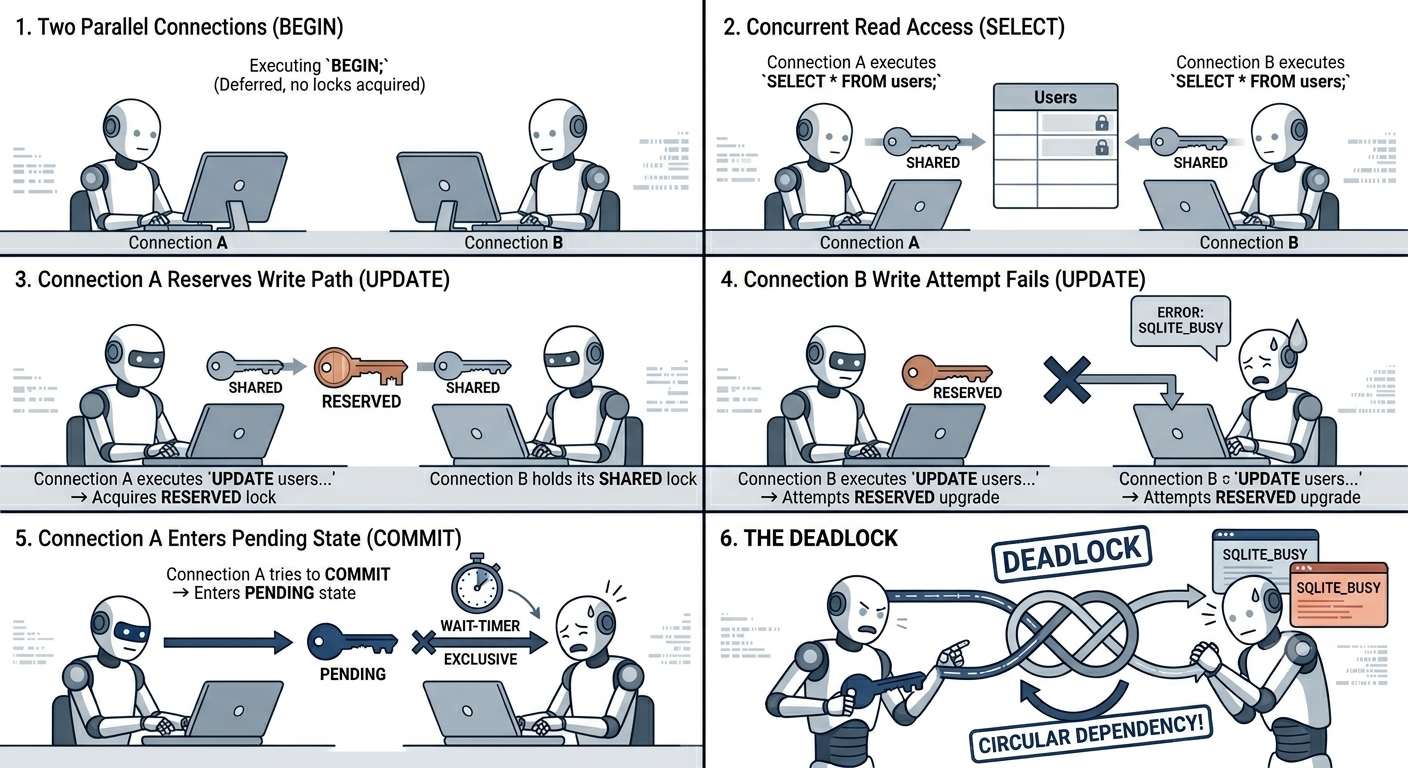
The Deadlock Scenario (Rollback Mode)
Imagine two parallel database connections (Connection A and Connection B) executing code simultaneously:
- Connection A: Executing
BEGIN;(Deferred, no locks acquired). - Connection B: Executing
BEGIN;(Deferred, no locks acquired). - Connection A: Executing
SELECT * FROM users;-> Acquires a SHARED lock. - Connection B: Executing
SELECT * FROM users;-> Acquires a second, concurrent SHARED lock. - Connection A: Executing
UPDATE users SET status = 'active';-> Attempts to upgrade to a RESERVED lock. This succeeds because no other connection has a reserved lock yet. - Connection B: Executing
UPDATE users SET status = 'pending';-> Attempts to upgrade to a RESERVED lock. FAILS! Only one reserved lock can exist. Connection B receives anSQLITE_BUSYerror. - Connection A: Tries to commit. To commit, it must upgrade from
RESERVED->PENDING->EXCLUSIVE. It enters thePENDINGstate and waits for allSHAREDlocks to clear. - The Deadlock: Connection A is waiting for Connection B to release its
SHAREDlock. Connection B is stuck handling anSQLITE_BUSYerror inside its uncommitted transaction, holding onto itsSHAREDlock.
The Solution: “Upfront” Locking
To eliminate this class of transaction failures, you must tell SQLite your intent immediately:
-- If your transaction will perform ANY write operation (INSERT, UPDATE, DELETE),
-- ALWAYS start it with IMMEDIATE:
BEGIN IMMEDIATE;
By starting with BEGIN IMMEDIATE, Connection B would have failed or blocked at step 2, long before acquiring a SHARED lock that could cause a deadlock with Connection A.
5. Breaking Isolation: READ UNCOMMITTED Mode
There is exactly one way to drop SQLite’s isolation below SERIALIZABLE. It requires a highly specific setup:
- The database connections must reside within the same process.
- Shared Cache Mode must be explicitly enabled at the database driver level.
- The connection must explicitly toggle the read uncommitted pragma:
PRAGMA read_uncommitted = TRUE;
When these criteria are met, a SELECT statement on Connection A can read data that has been modified by Connection B inside a transaction, before Connection B has issued a COMMIT. If Connection B performs a ROLLBACK, Connection A has officially performed a Dirty Read.
Note: For almost all modern web and desktop applications, Shared Cache mode is discouraged, and lowering the isolation level is unnecessary.
6. What You Must Understand
To build applications with SQLite, keep these rules in mind:
- Isolation within the same connection is non-existent: Isolation only exists between distinct connections.
- Always Use WAL Mode: Unless you are running on a network filesystem (which WAL doesn’t support due to shared-memory architecture limitations), always use
PRAGMA journal_mode=WAL;. It decouples readers from writers and mimics standard production databases. -
Match Your
BEGINto Your Intent: * Use defaultBEGIN(DEFERRED) only for purely read-only transactions.- Use
BEGIN IMMEDIATEfor any transaction that modifies data.
- Use
- Handle
SQLITE_BUSYGracefully: Configure a busy timeout (PRAGMA busy_timeout = 5000;) so that SQLite will automatically retry acquiring locks for up to 5000ms before throwing an error […] - SQLite is a Single-Writer DB: No matter how many threads or processes you throw at it, write operations must take turns. Design your long-running processes around short, atomic transactions to keep the write lock available.
6. Dotnet example
using Microsoft.Data.Sqlite;
using Dapper;

public class UserRepository
{
    private readonly string _connectionString = "Data Source=myapp.db";

    public void DoWork()
    {
        using var connection = new SqliteConnection(_connectionString);
        connection.Open();

        // Apply all PRAGMAs immediately after opening
        InitializePragmas(connection);

        // ... your Dapper queries here ...
    }

    private void InitializePragmas(SqliteConnection connection)
    {
        // Enable Write-Ahead Logging
        connection.Execute("PRAGMA journal_mode=WAL;");

        // Set Busy Timeout (Waits up to 5000ms / 5 seconds for locks)
        connection.Execute("PRAGMA busy_timeout = 5000;");

        // Recommended performance/safety settings for WAL
        connection.Execute("PRAGMA synchronous=NORMAL;");
        connection.Execute("PRAGMA foreign_keys=ON;");
    }
}
That’s it & see you soon!.